JCM PIDS Scripting#
PIDS Scripting allows you to use JavaScript to control Scripted PIDS Preset contents.
Important note!
There have been multiple attempts regarding PIDS Customization with the MTR Mod.
This system is not compatible with any of the following:
- PIDS Layout Editor / PIDS Modularization / PIDS JSON by EpicPuppy
- PIDS text customization seen in early betas of MTR 4.
You are not able to import any data from the above to this system, and the way it works is fundamentally different.
Therefore, this can be seen as a replacement to the above systems which supports the latest/official MTR mod releases, but not a drop-in replacement. The barrier to entry is higher, though it also means that more complex PIDS displays can benefit from this.
Concept#
Draw/Rendering#
JCM PIDS Scripting allows you to draw either a Text or Texture onto the Minecraft World.
When drawn, they are just regular polygons rendered onto the Minecraft World rather than being a 2D plane with a texture. Therefore it is possible for elements to overflow beyond the PIDS screen, and it is the developer responsibility to ensure such events should not happen.
If you absolutely require sophisticated image processing/clipping, you may follow this section to draw and manipulate a texture and draw it onto a 2D Plane. However it may result in slightly slower performance/higher memory usage.
Draw Layer/Order#
The draw order/z-index is depicted by the order the image is drawn in. Whichever elements gets drawn later, whichever element goes in-front. See the image below: (z-differences is exaggerated for demonstration purposes)
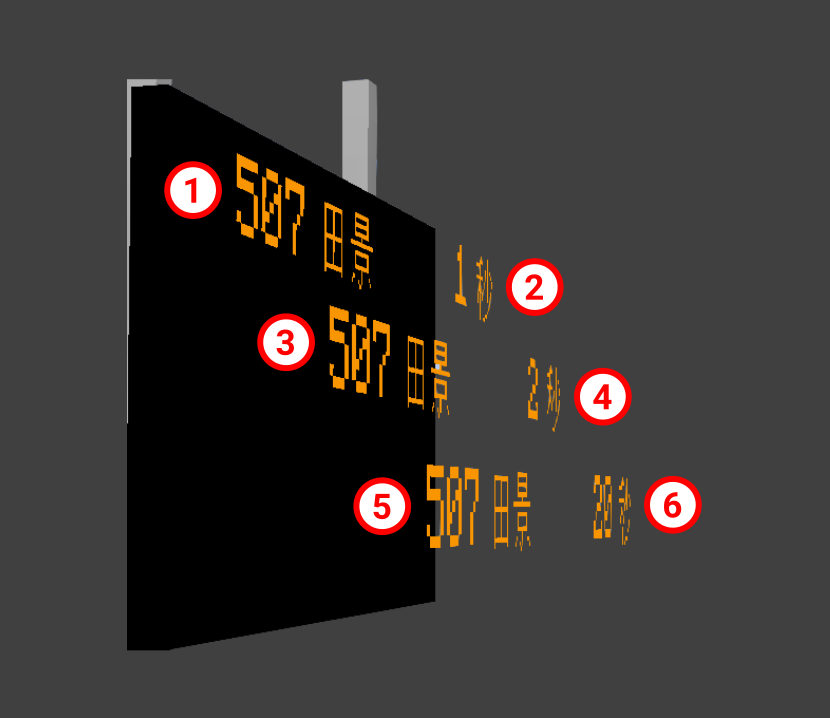
The number in the circle depicts the order in which the element is drawn in. 1 gets drawn first, then 2, 3, 4, 5 and finally 6.
As such, element 6 is the frontmost element, which can cover element 1-5 if overlapped.
Implementation#
Script Registration#
A preset is automatically considered as a Scripted PIDS Preset by specifying either scriptFiles or scriptTexts property in joban_custom_resources.json:
{
  "pids_images": [
    {
      "id": "pids_tut",
      "name": "JS Tutorial Preset",
      "scriptTexts": ["print('Goodbye World');"],
      "scriptFiles": ["jsblock:scripts/pids_tut.js"],
      "scriptInput": {"announcement_text": "何意味是什麼意思"}
    }
  ]
}
scriptFilesis an array containing the locations of .js scripts. Multiple scripts can be specified.scriptTextsallows you to directly write JS inside, and are executed before the scripts in scriptFiles.scriptInputallows you to specify arbitary JSON object. This is then made accessible to the .js scripts via the variableSCRIPT_INPUT.
Note: At the moment, mixing Scripted PIDS Preset and JSON PIDS Preset is not possible.
Called Functions#
Your script can include the following functions that JCM will call as needed:
function create(ctx, state, pids) { ... }
function render(ctx, state, pids) { ... }
function dispose(ctx, state, pids) { ... }
| Functions | Description |
|---|---|
create |
It is called when a PIDS is rendered for the first time and can be used to perform some initialization operations, for example, to create dynamic textures. |
render |
This function is called at-most once per frame. It is used to draw contents onto the PIDS. In practice however, the code is executed in a separate thread so as not to slow down FPS. If it takes too long to execute the code, it may be called once every few frames instead of every frame. |
dispose |
Called when a PIDS Block goes out of sight. Can be used for things like releasing the dynamic textures to free up memory. |
JCM calls these functions with three parameters, each of which is described below.
| Parameter | Description |
|---|---|
First (ctx) |
Used to pass rendering actions to JCM. Type — PIDSScriptContext. |
Second (state) |
A JavaScript object associated with a single PIDS Block. The initial value is {}, and its content can be set arbitrarily to store what should be different for each PIDS Block. |
Third (pids) |
Used to get the status of pids and arrivals. Type — PIDSBlockEntity |
The following lists all the rendering control operations that can be performed and all the information that can be obtained about PIDS.
API Reference#
Check JCM Version#
You can obtain JCM version by using Resources.getAddonVersion("jcm").
This would return a string formatted like: 2.0.0-beta.5
Rendering Related#
PIDSScriptContext#
| Functions And Objects | Description |
|---|---|
PIDSScriptContext.getRenderManager(): RenderManager |
Obtain a RenderManager instance, which can be used to render stuff onto the Minecraft World. The base position are set to the block's position. |
PIDSScriptContext.getSoundManager(): SoundManager |
Obtain a SoundManager instance, which can be used to play sound onto the Minecraft World. The base position are set to the block's position. |
PIDSScriptContext.setAutoZOrdering(autoZOrdering: boolean): void |
To ensure z-fighting don't occur, by default JCM will translate a small amount (step) in the z-direction everytime you draw a text/texture. You can turn this behaviour off by setting autoZOrdering to false, then you can use Text/Texture#zOrder(order: int) to control the z-order manually |
PIDSScriptContext.setZOrderStep(distanceMeter: double): void |
To ensure z-fighting don't occur, by default JCM will translate a small amount (step) in the z-direction everytime you draw a text/texture. Here you can pass in a custom step value. By default this is 0.0002 |
PIDSScriptContext.setDebugInfo(key: String, value: object): void |
Output debugging information in the upper left corner of the screen. You need to enable Script Debug Overlay in JCM Settings to display it.key is the name of the valuevalue is the content (value will be converted to string for display, except for GraphicsTexture which will display the entire texture image on the screen). |
Text#
| Functions And Objects | Description |
|---|---|
Text.create(): TextText.create(comment: String): Text |
Create a new text object |
Text.pos(x: double, y: double): Text |
Set the X and Y position of the element |
Text.size(w: double, h: double): Text |
Set the width and height of the element (Used in conjunction with Text.stretchXY() and Text.scaleXY()) |
Text.text(str: String): Text |
Set the text content to str |
Text.scale(i: double): Text |
Set the text's scale to i. Defaults to 1Note: This scales the whole text component, you should divide your scale when specifying .size() for instance. |
Text.leftAlign(): Text |
Align the text to the left (Default) |
Text.centerAlign(): Text |
Align the text to the center |
Text.rightAlign(): Text |
Align the text to the right |
Text.shadowed(): Text |
Add shadow to the drawn text |
Text.italic(): Text |
Set the text style to Italic |
Text.bold(): Text |
Set the text style to Bold |
Text.lineHeight(factor: number): Text |
Set the line height in factor (Default: 1, corresponds to 9 unit) Only used for wrapText to set additional spacing between lines. |
Text.stretchXY(): Text |
Text Overflow Mechanism: When text overflowed beyond it's size, stretch the text on the overflowing axis to fit |
Text.scaleXY(): Text |
Text Overflow Mechanism: When the text overflowed beyond it's size, stretch the text on both axis to fit (Keep aspect ratio) |
Text.wrapText(): Text |
Text Overflow Mechanism: When the text overflowed beyond it's size, split the text into the next line without any scaling. |
Text.marquee(): Text |
Text Overflow Mechanism: When the text overflowed beyond it's size, draw a portion of the text at a time with scrolling animation |
Text.marquee(duration: double): Text |
Same as above, but enforce how long a marquee cycle takes. (In Minecraft Tick) |
Text.withMarqueeProgress(progress: double): Text |
A value from 0.0 - 1.0, allowing you to override/control the marquee sliding progress directly. |
Text.fontMC(): Text |
Use vanilla Minecraft's font. |
Text.naturalLight(): Text |
Set the brightness of the text to be the in-game world light. |
Text.renderType(renderType: String): QuadDrawCall |
Specify a render type to use. - EXTERIOR: Same as the one used on train exterior, use the light level at the current position.- EXTERIOR_TRANSLUCENT: Same as EXTERIOR, but supports translucency.- INTERIOR: Same as the one used on train interiors, use full light level, normals/face shadings are applied.- INTERIOR_TRANSLUCENT: Same as INTERIOR, but supports translucency.- LIGHT (default): Full brightness without any shading, suitable for LCD screens.- LIGHT_TRANSLUCENT: Same as LIGHT, supports translucency. |
Text.matrices(matrices: Matrices): Text |
Apply a matrices to the current text object |
Text.font(id: String): TextText.font(id: Identifier): Text |
Set the font by it's ID. Defaults to mtr:mtrThe font should be loaded in Minecraft via the font json format. This does not have any effect if Use Custom MTR Font is disabled in MTR mod's Config. |
Text.color(color: int): Text |
Set the text color, in RGB format. |
Text.draw(ctx: PIDSScriptContext): void |
Mark the text as something that should be rendered to the PIDS. |
Text.zOrder(order: int): Text |
Specify the z-order manually. |
Texture#
| Functions And Objects | Description |
|---|---|
Texture.create(): TextureTexture.create(comment: String): Texture |
Create a new texture to be drawn in the world. |
Texture.pos(x: double, y: double): Texture |
Set the X and Y position of the element |
Texture.size(w: double, h: double): Texture |
Set the width and height of the element |
Texture.texture(id: String): TextureTexture.texture(id: Identifier): Texture |
Set the texture ID to draw. Note that the texture ID should point to a PNG file or an .mcmeta file. |
Texture.color(color: int): Texture |
Set the texture color, in RGB format. |
Texture.uv(u2: float, v2: float): TextureTexture.uv(u1: float, v1: float, u2: float, v2: float): Texture |
Set the UV coordinates |
Texture.naturalLight(): Text |
Set the brightness of the texture to be the in-game world light. |
Texture.matrices(matrices: Matrices): Texture |
Apply a matrices to the current texture |
Texture.draw(ctx: PIDSScriptContext): void |
Mark the texture as something that should be rendered to the PIDS. |
Texture.zOrder(order: int): Texture |
Specify the z-order manually. |
PIDS Object Related#
PIDSBlockEntity#
| Functions And Objects | Description |
|---|---|
PIDSBlockEntity.type: String |
Return the type of PIDS used, possible value are: - rv_pids - rv_pids_sil_1 - rv_pids_sil_2 - lcd_pids - pids_projector - pids_1a |
PIDSBlockEntity.width: int |
The full width of the available PIDS screen area. |
PIDSBlockEntity.height: int |
The full height of the available PIDS screen area. |
PIDSBlockEntity.rows: int |
The number of arrival rows supported by the PIDS Block |
PIDSBlockEntity.isRowHidden(i: int): boolean |
Returns whether the arrival for that row is hidden. (via PIDS Config) |
PIDSBlockEntity.getCustomMessage(i: int): String |
Returns the custom message configured for that row via PIDS Config. Empty string ( "") if not set. |
PIDSBlockEntity.getTargetPlatformIds(): List<Long> |
Returns the detected platform id by the PIDS, regardless of whether the platform has any arrival or not. This is either the auto-detected platforms, or specific arrival platform as configured to the PIDS. |
PIDSBlockEntity.isPlatformNumberHidden(): boolean |
Returns whether the platform number is set to hidden. (via PIDS Config) |
PIDSBlockEntity.blockPos(): Vector3f |
Returns the coordinate of which the PIDS block is located. |
PIDSBlockEntity.isKeyBlock(): boolean |
Returns whether the current block is a unique block within a PIDS pair (e.g. Identify 1 side of a dual-sided PIDS) |
PIDSBlockEntity.station(): Station? |
Returns the station area that this PIDS is in. Null if not in any station, or the client is not aware of the station. |
PIDSBlockEntity.arrivals(): ArrivalEntries |
Returns the arrivals obtained for the PIDS. |
ArrivalEntries#
| Functions And Objects | Description |
|---|---|
ArrivalEntries.get(i: int): ArrivalEntry? |
Returns the ith arrival entry. Null if there's no ith arrival entry or no arrival information. Note that only up to 10 arrivals is fetched per platform, see this issue for details. |
ArrivalEntries.mixedCarLength(): boolean |
Returns whether the list of arrivals have arrival entry with different cars. |
ArrivalEntries.platforms(): List<Platform> |
Returns the platforms that all arrival entry is stopping at. |
ArrivalEntry#
Represent a single arrival entry.
| Functions And Objects | Description |
|---|---|
ArrivalEntry.destination(): String |
Returns the destination name of the arrival entry. (Usually the destination's station, or a custom destination string) |
ArrivalEntry.arrivalTime(): long |
Returns the epoch time (in Millisecond) the vehicle will arrive at. Use new Date(value: number)to obtain a JS Date object of the arrival time. |
ArrivalEntry.departureTime(): long |
Returns the epoch time (in Millisecond) the vehicle will depart at. Use new Date(value: number)to obtain a JS Date object of the departure time. |
ArrivalEntry.deviation(): long |
Returns the deviation from the scheduled timetable. Positive value indicate the train is late. Negative value indicates the train is early. |
ArrivalEntry.realtime(): boolean |
Returns whether the arrival entry is scheduled (i.e. Vehicle not departed), or a real-time estimation (i.e. Vehicle running) |
ArrivalEntry.departureIndex(): long |
Returns the departure index of the vehicle. The departure index is incremented for every scheduled departure of each individual sidings. It is wrapped back to 0 at 00:00 UTC (For real-time scheduling).A departure index of -1 indicates the vehicle has either not yet departed, or it is a manually departed train. |
ArrivalEntry.terminating(): boolean |
Returns whether the arrival entry will terminate its service at the current platform. |
ArrivalEntry.route(): SimplifiedRoute? |
Returns the SimplifiedRoute object that the vehicle is running on. Returns null if the route cannot be found (e.g. Hidden/Deleted/Not fetched) |
ArrivalEntry.routeId(): long |
Returns the id of the route that the vehicle is running on when arrived. |
ArrivalEntry.routeName(): String |
Returns the name of the route that the vehicle is running on when arrived. |
ArrivalEntry.routeNumber(): String |
Returns the route number string (Previously called LRT Route Number), empty string if route number is not set. |
ArrivalEntry.routeColor(): int |
Returns the color of the route that the vehicle is running on when arrived. |
ArrivalEntry.circularState(): Route.CircularState |
Returns the circular state of the route that the vehicle is running on. |
ArrivalEntry.platform(): Platform? |
Returns the Platform object that the vehicle will approach at the monitored platform. Returns null if the platform cannot be found (e.g. Hidden/Deleted/Not fetched) |
ArrivalEntry.platformId(): long |
Returns the id of the platform that the vehicle will approach at. |
ArrivalEntry.platformName(): String |
Returns the name of the platform that the vehicle will approach at. |
ArrivalEntry.carCount(): int |
Returns the number of cars the vehicle has. |
ArrivalEntry.cars(): List<CarDetails> |
Returns a List containing CarDetails for each car. |
Transport Simulation Core Related#
Transport Simulation Core (TSC) is the backend serving MTR 4. Below are some of the classes in TSC, which may be returned by JCM above.
CarDetails#
| Functions And Objects | Description |
|---|---|
CarDetails.getVehicleId(): String |
Returns the id of the vehicle car (As defined in Resource Packs) |
Using AWT Graphics/Dynamic Textures#
While not a regular tested use case for PIDS, you can create a Dynamic Textures and draw it onto a PIDS:
importPackage(java.awt);

function create(ctx, state, pids) {
    state.tex = new GraphicsTexture(pids.width, pids.height);
}

function render(ctx, state, pids) {
    let g = state.tex.graphics;
    g.setColor(Color.RED);
    g.fillRect(0, 0, pids.width, pids.height);
    g.setColor(Color.GREEN);
    g.fillRect(0, 0, Math.abs(Math.sin(Timing.elapsed())) * pids.width, pids.height);

    state.tex.upload();

    Texture.create("Dynamic Texture")
    .texture(state.tex.identifier)
    .size(pids.width, pids.height)
    .draw(ctx);
}

function dispose(ctx, state, pids) {
    state.tex.close();
}