Minecraft APIs
It may be desirable to access Minecraft methods/fields in scripts (Whether it's to know more about the surrounding environment or you want to, say display a chat message).
Given Rhino (The JS Engine)'s JS-to-Java interoperability feature, this should not be a difficult task to do. Unfortunately because Minecraft's code is obfuscated (Until Minecraft 26.1, which JCM does not support), it means there's not an intuitive and cross-loader way to access these methods.
Therefore, the following wrapper objects are provided to allow invoking certain Minecraft methods. You may also come across these classes in other places (e.g. PlayerEntity/ItemStack in eyecandy block use event) as it is the most natural and straightforward way to represent a Minecraft object.
MinecraftClient#
This has several utilities method related to the Minecraft Client.
| Functions | Description |
|---|---|
static MinecraftClient.worldIsRaining(): boolean |
Is it raining in the world? |
static MinecraftClient.worldIsThundering(): boolean |
Is it thundering in the world? |
static MinecraftClient.worldIsRainingAt(pos: Vector3f): boolean |
Is it raining and getting wet in a given chunk? |
static MinecraftClient.worldDayTime(): int |
Returns the in-game world time in ticks. |
static MinecraftClient.blockLightAt(pos: Vector3f): int |
Return the block light at the specified position. |
static MinecraftClient.skyLightAt(pos: Vector3f): int |
Return the sky light at the specified position. |
static MinecraftClient.lightLevelAt(pos: Vector3f): int |
Return the light level at the specified position. Sourced from both sky light and block light, prefers the one which is lower. |
static MinecraftClient.narrate(message: String): void |
This calls the Minecraft narrator to narrate the message. |
static MinecraftClient.localPlayer(): PlayerEntity |
Obtain the PlayerEntity of the current player. |
static MinecraftClient.getScoreboardScore(objectiveName: String, playerName: String): int |
This obtain the player's scoreboard value on the specified scoreboard objective. Note: Only works on scoreboard visible in the client's GUI. (e.g. Sidebar/Player Tab) |
static MinecraftClient.getRedstoneLevel(pos: Vector3f): int |
Returns the received redstone level of the block in pos. |
static MinecraftClient.displayMessage(message: String, actionBar: boolean): void |
This displays the message as an in-game chat message. If action bar is true, it will display on the action bar instead. (Above inventory hotbar) |
static MinecraftClient.displayMessage(message: VanillaText, actionBar: boolean): void |
Same as above, but use VanillaText as the chat message to display. |
static MinecraftClient.spawnParticleInWorld(particleId: Identifier, pos: Vector3f, initialVelocity: Vector3f, alwaysSpawn: boolean = false): void |
Spawn a particle in pos of the current world, with an initial velocity of initialVelocity.Only built-in vanilla particles are supported, see the Minecraft Wiki page for particle ids. Set alwaysSpawn to true to bypass Minecraft's particle option preference. (Only use this for critical particle effect that must be displayed) |
static MinecraftClient.renderDistance(): int |
Obtain the render distance (In Chunk) that is configured in the Minecraft Option. |
static MinecraftClient.getWorldPlayers(): List<PlayerEntity> |
Obtain a list of PlayerEntity that is currently in view of the render distance in the current world. |
static MinecraftClient.gamePaused(): boolean |
Returns whether the game is paused. This may be used to pause rendering/texture update to reduce CPU usage when paused. Note: MTR 4/TSC does not pause its simulation even when the game is paused! |
VanillaText#
Minecraft employs it's own text format called the Text Component Format. This provides access to create these components, which may then be used in MinecraftClient#displayMessage to produce formatted texts.
| Functions | Description |
|---|---|
static VanillaText.literal(str: String): VanillaText |
Creates a text component with the str parameter as the content |
static VanillaText.translatable(key: String, placeholders: objects...): VanillaText |
Creates a text component with the key being the translation key, which can be adapted to the user's current language. Any additional parameters for placeholders may be specified in case a translation supports string substitution |
VanillaText.append(other: VanillaText): VanillaText |
This append another VanillaText after the current VanillaText, the styles for each VanillaText are retained. |
VanillaText.withBold(): VanillaText |
Set the VanillaText text to bold |
VanillaText.withItalic(): VanillaText |
Set the VanillaText text to italic |
VanillaText.withFont(id: Identifier): VanillaText |
Set the VanillaText text to use a specific Font Identifier as the displayed font, which is registered by resource pack. |
VanillaText.withColor(rgb: int): VanillaText |
This sets the corresponding RGB code as the color to display the text |
VanillaText.withColor(colorName: String): VanillaText |
This sets the color to display the text |
VanillaText.clickToCopyText(clipboardText: String): VanillaText |
When supplied, this will copy the clipboardText content when players clicked on the text message in their chatbox. |
VanillaText.clickToOpenURL(url: String): VanillaText |
When supplied, this will attempt to open url when players clicked on the text message in their chatbox.Note that vanilla provide an additional warning screen for unseen URLs, so it is not a guarentee the url will open immediately. |
VanillaText.withHoverText(content: String): VanillaText |
Provides the content that will be shown when player hovers their mouse on the text in their chatbox. |
VanillaText.withHoverText(content: VanillaText): VanillaText |
Same as above, but with VanillaText for customization with the hover text itself. |
VanillaText.getString(): String |
This returns the literal text content of the VanillaText. Useful when paired with VanillaText.translatable() so you can access the string localized in the user's language. |
Example#
Displaying a chat message every 1.5s in an eyecandy script.
function create(ctx, state, eyecandy) {
    state.outputInterval = new RateLimit(1.5); // Every 1.5s
}

function render(ctx, state, eyecandy) {
    if(state.outputInterval.shouldUpdate()) {
        // Create a standalone text
        let textILoveJs = VanillaText.literal(" I love JavaScript /s")
                            .withColor(0x00BBFF)
                            .withBold();

        // or we can append both text (Hello / World) inline
        let textHelloWorld = VanillaText.literal("Hello ")
            .withItalic()
            .withColor("RED")
            .append(
                VanillaText.literal("world!")
                .withItalic()
                .withColor(0x00FF00)
                .withFont(Resources.id("mtr:mtr"))
            );

        let textToSend = textHelloWorld.append(textILoveJs);
        MinecraftClient.displayMessage(textToSend, false);
    }
}

VoxelShape#
This allows you to construct the outline shape of a block, which can be used to allow setting a custom outline shape to an Eyecandy block.
| Functions | Description |
|---|---|
static VoxelShape.empty(): VoxelShape |
Returns an empty VoxelShape |
static VoxelShape.fullCube(): VoxelShape |
Returns a VoxelShape that is equivalent to a 16x16 rectangle block |
static VoxelShape.create(minX: double, minY: double, minZ: double, maxX: double, maxY: double, maxZ: double): VoxelShape |
Returns a VoxelShape with the specified size. The max[?] parameter must always be equal/larger than the min[?] parameters.Unit are 16x16 (16 = 1 full block) |
static VoxelShape.create(minX: double, minY: double, minZ: double, maxX: double, maxY: double, maxZ: double, facing: Direction): VoxelShape |
Same as above, but rotated according to the facing parameter. You may obtain the facing direction via EyecandyWrapper.facing() |
VoxelShape.combine(other: VoxelShape): VoxelShape |
This returns a new VoxelShape where two different VoxelShape are merged together. |
Example#
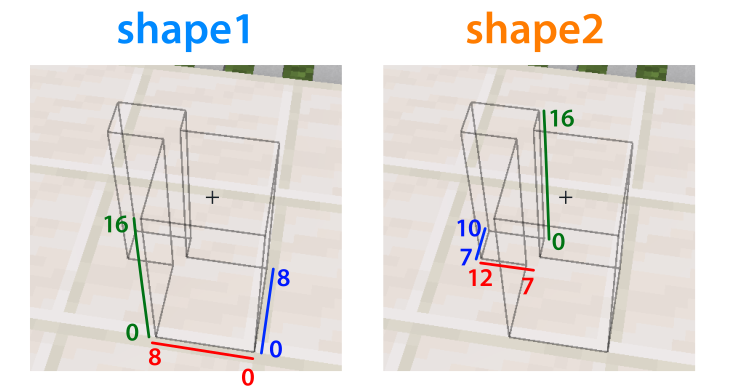
Setting an outline shape for an eyecandy:
function create(ctx, state, eyecandy) {
    const shape1 = VoxelShape.create(0, 0, 0, 8, 16, 8, eyecandy.facing());
    const shape2 = VoxelShape.create(7, 0, 7, 12, 16, 10, eyecandy.facing());
    const myShape = shape1.combine(shape2);
    ctx.setOutlineShape(myShape);
}
ItemStack#
An Item Stack (The thing that takes up your hotbar slot).
This is usually supplied/obtainable via events/code rather than something to be constructed by your script.
Note on Item vs ItemStack
In Minecraft, there's a distinction between an Item (An immutable representation of an item, with an id) and ItemStack (An instance of that item with a specific amount/durability/enchanting/custom names/Custom NBT which can be changed at any time).
Currently this distinction is not made in the Scripting API.
| Functions | Description |
|---|---|
ItemStack.itemId(): String |
Obtain the item id (e.g. mtr:rail)` |
ItemStack.translationId(): String |
Obtain the translation key of the item |
ItemStack.empty(): boolean |
Whether the itemstack is considered empty (e.g. Air) e.g. If this is true when trying to obtain the item the player is holding, this means the player isn't holding anything. |
ItemStack.count(): int |
Get the amount of the ItemStack |
PlayerEntity#
Represents a player entity in the game.
This is usually supplied/obtainable via events/code rather than something to be constructed by your script.
| Functions | Description |
|---|---|
PlayerEntity.uuid(): String |
Obtain the entity's uuid as a string |
PlayerEntity.hasPermissionLevel(level: int): boolean |
Whether the player has a certain "OP" level. Note: This is completely client-side only, do not use this for serious permission/authentication checking! |
PlayerEntity.pos(): Vector3f |
Obtain the current position of the player, as a Vector3f |
PlayerEntity.blockPos(): Vector3f |
Obtain the current block position of the player, as a Vector3f. |
PlayerEntity.smoothPos(): Vector3f |
Obtain the smoothed pos of the player, useful for rendering. |
PlayerEntity.velocity(): Vector3f |
Obtain the current velocity of the player. |
PlayerEntity.yaw(): float |
Obtain the yaw rotation of the player head. |
PlayerEntity.pitch(): float |
Obtain the pitch rotation of the player head. |
PlayerEntity.bodyYaw(): float |
Obtain the yaw rotation of the player's body. |
PlayerEntity.playerName(): String |
Obtain the player's canonical name/username (Same as those registered in Mojang's/Microsoft server) |
PlayerEntity.isHoldingItem(id: Identifier): boolean |
Whether player is holding an with the corresponding Item ID on either hand. |
PlayerEntity.mainHandItem(): ItemStack |
Obtain the ItemStack in the player's main hand |
PlayerEntity.offHandItem(): ItemStack |
Obtain the ItemStack in the player's secondary/offhand |
PlayerEntity.activeItem(): ItemStack |
Obtain the ItemStack in the player's hands, preferring main hand. |
PlayerEntity.isSneaking(): boolean |
Whether the player is sneaking. |
PlayerEntity.isSprinting(): boolean |
Whether the player is sprinting. |
PlayerEntity.isSwimming(): boolean |
Whether the player is swimming. |