Script Debug Overlay#
To better visualize errors and performance of your script, you can turn on Script Debug Overlay, which enables an in-game HUD overlay, showing all script instances that are currently executed.
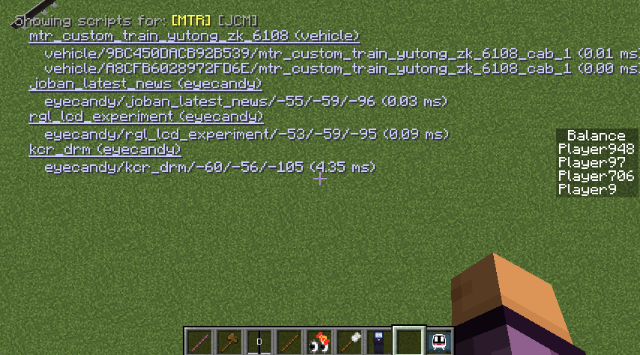
Enable the overlay#
Go to Mod Menu / Mod Config Screen (Forge), find JCM and click on Configure.
After that, make sure the Script debug mode checkbox is checked, then click Save Config.
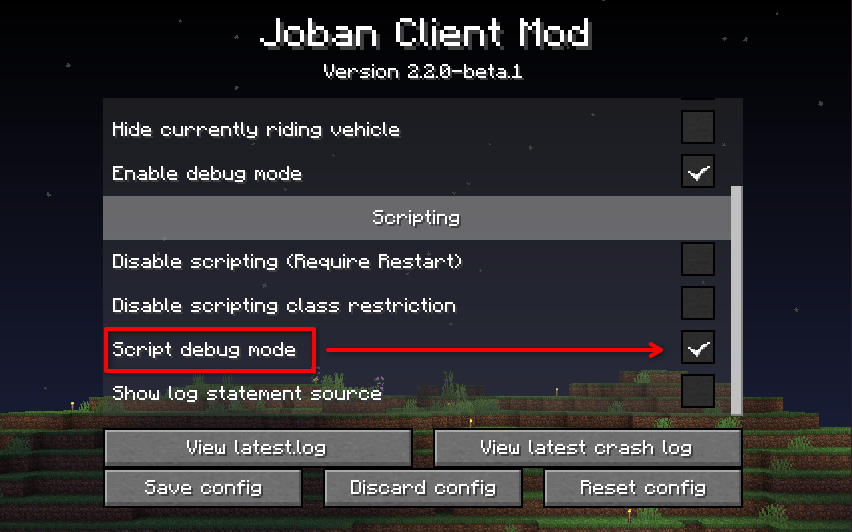
How to read the overlay#
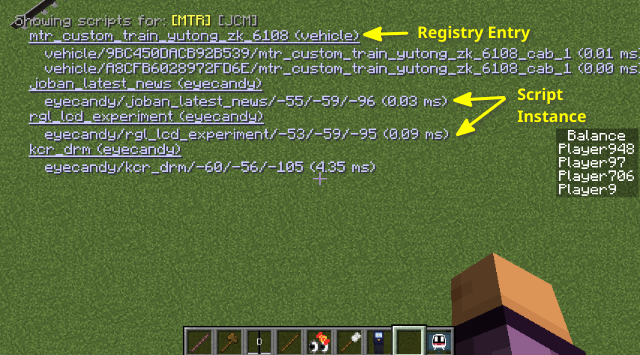
- For each underlined text, it represents a registry entry of the script. The type of scripts are appended after the text (e.g.
(eyecandy))- For each indented items, it represents an instance of the script. Note that these instances are "virtual", as in there's still only a single instance of your script, but to keep track of the state variables and draw calls, JCM uses a concept called instance to associate data for each uniquely identifiable script objects in the world, and invoke the
render()function with values from different instances. - There are 3 colors for each instances: Blue (Normal), Yellow (Slightly slow execution) and Red (Relatively slow execution).
- Script developers should generally aim for the Blue color if possible.
- For each indented items, it represents an instance of the script. Note that these instances are "virtual", as in there's still only a single instance of your script, but to keep track of the state variables and draw calls, JCM uses a concept called instance to associate data for each uniquely identifiable script objects in the world, and invoke the
"Frozen" scripts#
If a script is being executed for more than 5s (e.g. Infinite Loop Bug), the debug overlay would label the script as (Not Responding).
If it is still unresponsive after another 5s, the script would be aborted.
Navigate between sources#
Since mixing all script instances into 1 view would clutter up the overlay, the overlay are separated by different "source". For instance, it will only show scripts coming from [MTR] (Vehicle/Eyecandy Scripting), and [JCM] (PIDS Scripting).
You can press [ and ] on your keyboard to select between them, they are also configurable in keybind settings in-case a conflict occurs.